Rollback netplay · Windows 10/11 · Free fan project
SF2X Online
The 1994 arcade 2X, online, with rollback netcode. Every set at TURBO 3.
You need your own ROM set: the 2X set ssf2xjr1.zip and its parent ssf2t.zip. The launcher checks them and builds the game on your PC. No game files are shared here.
Ryu · crouching HK · TURBO 3 Startup 5 Active 6 Recovery 25 −9 on block
The trailer
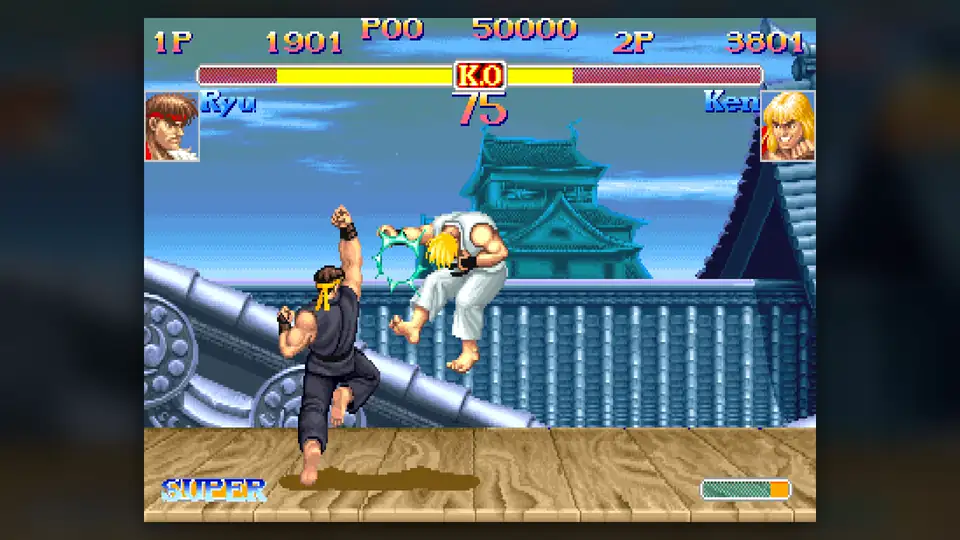
Everything in it is the real thing: our port running at TURBO 3, two PCs on rollback, the training mode and a replay taken over.
Online modes
- 01
Casual Battle
Fight whoever is online, from anywhere. No rating at stake.
Winner stays - 02
Ranked Battle
Ranked sets, rated with Glicko-2. Climb the season's ladder, overall and with each character.
First to 2 · Glicko-2 - 03
Rooms
Make a room for your friends. Play by turns and let the others watch every set live.
Spectators · Password - 04
Replays
Every online set is saved on your PC. Watch it again frame by frame, or step in and play it out.
Take over at any frame
Every online set runs at TURBO 3
On the arcade board's own timing: the speed tournaments play. Casual, ranked, rooms and tournaments alike.
Training mode
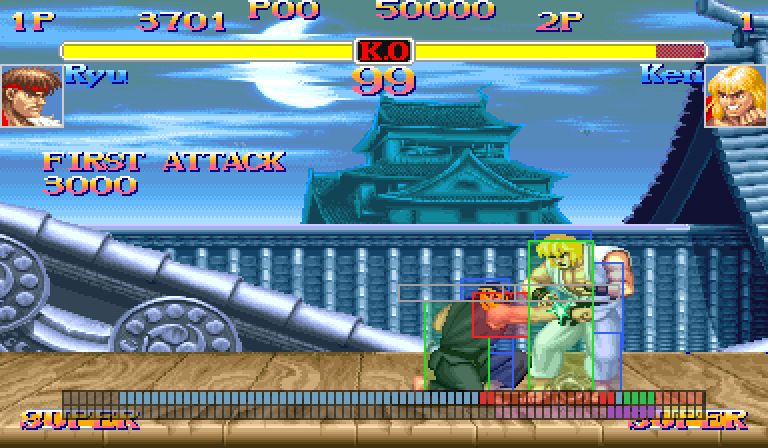
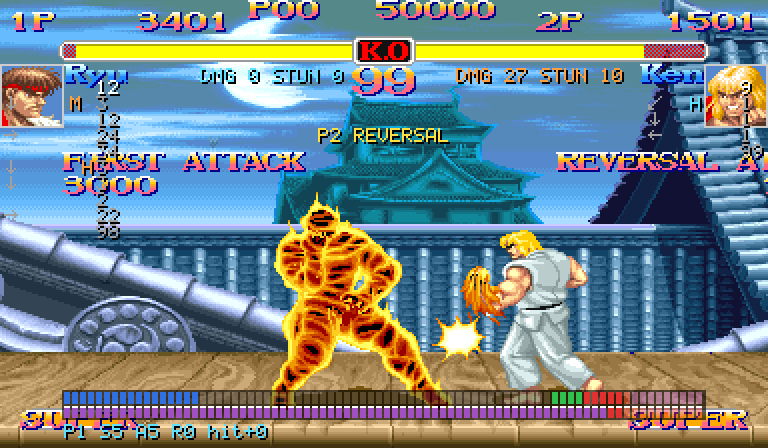
A modern training room for a game from 1994, without touching how it plays.
- Frame meter
- F8 on / off
- Frame advantage
- Hit / block
- Hitboxes
- Hit · hurt · push
- Attack data
- Dmg · stun
- Stun meter
- On
- Input history
- P1 · P2
- Dummy recording
- 5 slots
- Save states
- 3 slots
- Reversal
- Wake-up / block / hit
- Dummy guard
- None / all
- Throw tech
- On / off
- Super meter
- Normal / full
Reversals on wake-up, block and hit show the game's own REVERSAL message.
| Key | What it does |
|---|---|
| Back F3 | Training and replay menu |
| F6 | Save state |
| F7 | Load state |
| F8 | Frame meter on or off |
| F1 | Account, friends and rankings |
Rollback netcode
With delay alone, every button you press waits for the network before it shows. The worse the route, the heavier the game feels.
With rollback your input shows at once. The game predicts the other side's input and, when the real one arrives, corrects itself.
Your hands keep the timings they learnt offline: the same links, the same reversals.
| Delay only | Every input waits for the network. |
|---|---|
| Rollback | Your input shows at once; the game corrects itself when the other side's input arrives. |
Direct between players
Sets go straight from one PC to the other, over UDP. The server only finds your opponent.
Always the faster route
The game measures the direct route and the server's relay during every set, and keeps the faster one.
Delay that fits your ping
Input delay adapts to the connection and rollback hides the rest. You can also set it yourself.
Fixes itself
If the two games ever drift apart, they resync on their own without ending the set.
0 desyncs in our tests Two real clients over UDP on one PC, input delay 0
Rankings
Every ranked set counts, and the standings are public.
- Grandmaster2200
- Master2000
- Diamond1800
- Platinum1600
- Gold1400
- Silver1200
- Bronze1000
- Rookieunder 1000
Rank by Glicko-2 rating
Ready in a few minutes
Run the installer
A few seconds, no administrator rights needed.
Choose your ROM set
Point the launcher to your
ssf2xjr1.zipandssf2t.ziponce. It checks the 24 files by hash and builds the game on your PC, in a minute or two.Create your account
Pick a nickname and a password, go online and fight.
| System | Windows 10/11, 64-bit |
|---|---|
| Needs | Your own ROM set |
| Controllers | Stick, pad or keyboard |
| Price | Free |
| Source | Closed |
Windows note Windows may say it does not recognize the publisher, because the installer is not code-signed yet. Click More info, then Run anyway.
Questions
Is it free?
Yes. Nothing to buy and no ads. Donations help keep the servers running, open new ones and keep improving the netcode.
Do I need the game?
Yes. You need your own ROM set of the arcade 2X: ssf2xjr1.zip (Japan 940223) and its parent ssf2t.zip. The launcher checks the 24 files by hash and builds the game from them on your PC. Nothing of the game is ever sent to the server or shipped by us.
Where do I get the ROM set?
Not from us. We do not ship, link or trade ROMs, and we cannot help you find them: use a copy you own. Asking for ROMs, or posting them, on our Discord gets the message removed.
What do I need to run it?
A 64-bit Windows 10 or 11 PC, your ROM set, and a fight stick, a pad or the keyboard. For online play, an internet connection: a wired one plays best. The first start builds the game from your ROMs, which takes a minute or two; after that it starts at once.
Can I play offline?
Yes. The arcade mode against the computer, a versus on one PC with two controllers, and the training mode all work without an account or a connection.
Which speed does it play at?
TURBO 3, the speed tournaments play, on the arcade board's own timing. Online that is the same for everyone: casual, ranked, rooms and tournaments.
Can I play with a fight stick or a pad?
Yes. Any controller Windows sees works, and every menu can be used with it. The keyboard works too.
Where is the server?
The matchmaking server finds your opponent. Sets go directly between players whenever that is faster, so two players in the same region play over a route in that region.
Support the project
SF2X Online is made by fans and stays free. Donations go to two things: more servers in more regions as the community grows, and work on the netcode.
Made by
Espartaco. A fan project by a player, for players: free, with no ads.